
Childrens Computer Coding The Ultimate 2026 Resource Guide To Leveling Up
--- title: "Children's Computer Coding: The Ultimate 2026 Resource Guide to Leveling Up" slug: "childrens-computer-coding-the-ultimate-2026-resource-guide-to-le
title: "Children's Computer Coding: The Ultimate 2026 Resource Guide to Leveling Up" slug: "childrens-computer-coding-the-ultimate-2026-resource-guide-to-leveling-up" description: "Discover the best 2026 tools for children's computer coding. Turn screen time into a fun quest with our guide to top platforms, safety tips, and roadmaps." excerpt: "What if your child’s screen time didn't just drain their focus, but actually turned them into a digital architect? You probably worry about passive scrolling or feel stuck choosing" publishedAt: "2026-05-12T10:00:00.000Z" author: "LearnVerzo Team" categories:
- "Blog" coverImage: "https://getautoseo.com/storage/hero_images/article_1243923_1778518310.jpg" draft: false
What if your child’s screen time didn't just drain their focus, but actually turned them into a digital architect? You probably worry about passive scrolling or feel stuck choosing between Scratch and Python. It’s frustrating when you want to help but don't have the technical background to guide the quest. You aren't alone in wanting to turn "screen time" into "mastery time." The global market for children's computer coding is hitting $6.51 billion in 2026 for a reason. Parents are ready for education that feels like a game but builds real-world superpowers.
This guide is your ultimate resource to turning logic into a high-stakes adventure. We promise to help you find platforms that are as engaging as Fortnite, but way smarter. You’ll see exactly how to track tangible growth and navigate a clear roadmap from pre-reader to independent coder. We’re diving into the best 2026 tools, current safety regulations like KOSA, and strategies to help your child level up their future. Let’s start the quest.
Key Takeaways
-
Understand why coding is 90% logic and 10% syntax, focusing on problem-solving rather than just memorizing lines of text.
-
Follow a clear roadmap from pre-reader block logic to advanced Python mastery as your child evolves through different age phases.
-
Identify the top platforms for children's computer coding where learning feels like a quest in a high-stakes video game.
-
Use the "Active vs. Passive" framework to transform screen time from a passive distraction into a productive skill-building session.
-
Discover how a gamified curriculum provides the rewards and XP needed to keep your child engaged for the long term.
Table of Contents
-
What is Children's Computer Coding and Why is it a 2026 Essential?
-
The Coding Roadmap: From Pre-Reader Quests to Python Mastery
What is Children's Computer Coding and Why is it a 2026 Essential?
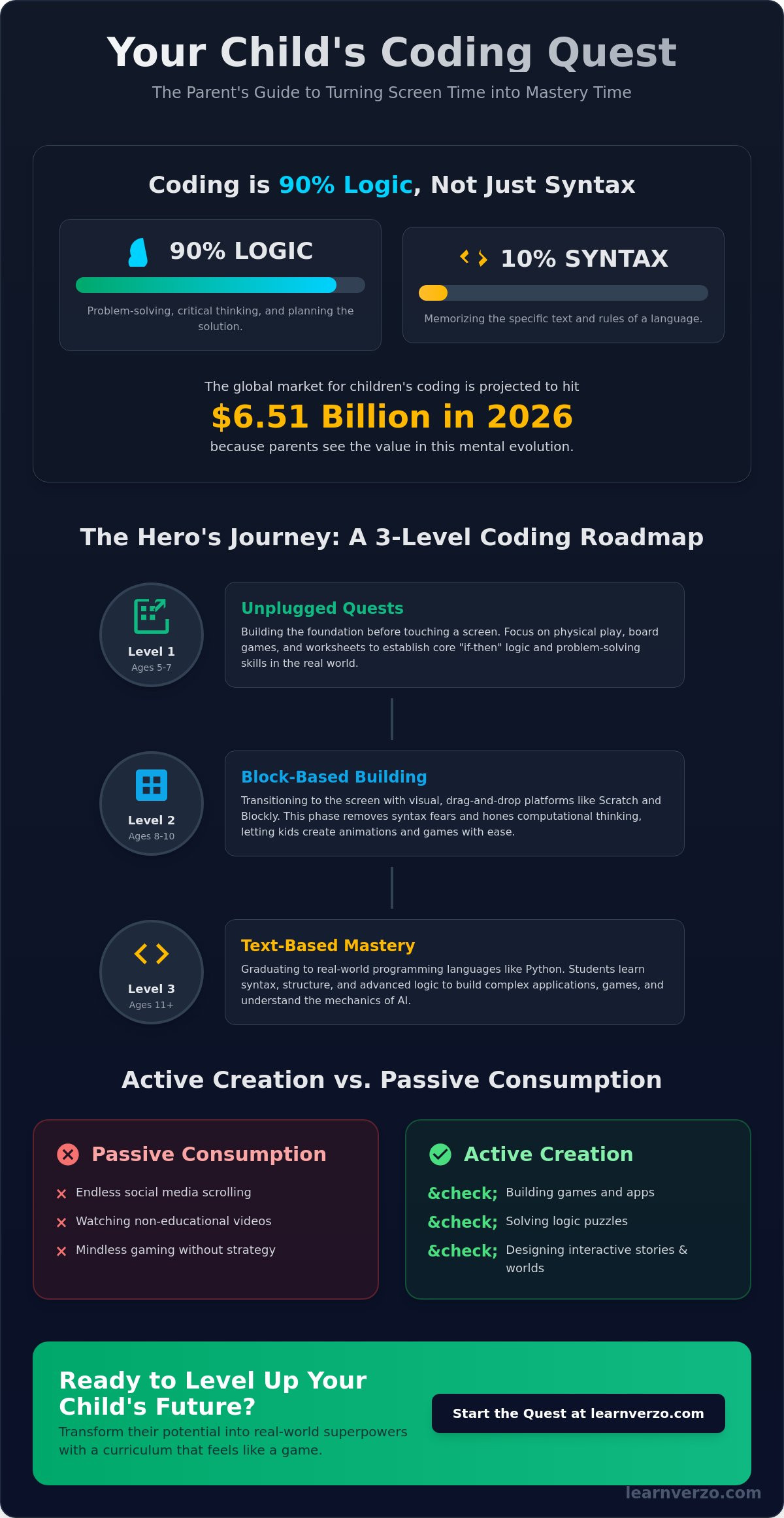
Imagine a world where your child doesn't just play games. They build them. In 2026, children's computer coding is no longer a niche hobby for the tech-obsessed. It is the core language of the digital universe. Think of it as the ultimate toolkit for the modern age. Most people think coding is just about memorizing cryptic text. That's a myth. Coding for kids is actually 90% logic and only 10% syntax. It’s about learning how to think, not just what to type. The global market for this skill is hitting $6.51 billion this year because parents see the value in this mental evolution.
We are seeing a massive shift right now. Kids are moving from passive consumption to active creation. Instead of scrolling through endless feeds, they are designing the mechanics behind them. This transition builds essential cognitive skills. It fosters computational thinking, deep resilience, and the kind of focus usually reserved for high-stakes chess matches. It turns the screen from a distraction into a forge for the mind.
The 'Superpowers' Gained Through Code
When a child learns to code, they unlock a suite of mental superpowers. Critical thinking becomes second nature. They learn to view a massive problem as a "Boss Level." They break that boss down into small, solvable tasks. This creates a loop of constant improvement. There is no such thing as failure; there is only debugging. This builds a grit that carries over into every other subject.
There is also a hidden benefit for schoolwork. Engaging with online coding games for elementary students directly reinforces numeracy. Coding is math in motion. It makes abstract concepts like variables and coordinates feel real. Plus, the confidence boost is massive. There is a specific dopamine hit that comes from seeing your own "quest" come to life on the screen. It transforms a student into a Scholar.
Coding vs. Digital Literacy
Many parents confuse being "tech-savvy" with being a coder. There is a huge difference between using technology and building it. Digital literacy is knowing how to use a tablet or a search engine. Coding is understanding the engine itself. It's the difference between driving a car and being the engineer who designed the motor.
In 2026, the bar is higher. It's not enough to know how to prompt an AI. Kids need to understand AI logic. They need to know how data flows and how algorithms make decisions. This is why we look at educational programming languages as the first step toward true mastery. Coding literacy is the new universal second language.
The Coding Roadmap: From Pre-Reader Quests to Python Mastery
Every great hero starts in the training grounds. You don't face the final boss without the right gear. Children's computer coding is a progression. It isn't a race to the finish. It’s a journey through three distinct phases of development. Each level unlocks new mental abilities. Your child will level up at their own pace. Respect the process. Mastery takes time. Here is how the quest unfolds.
Level 1: Unplugged Quests (Ages 5-7)
Before touching a keyboard, build the logic. Focus on physical play. Use board games and cards to teach "if-then" sequences. If the hero hits a wall, then they must turn right. This is where the foundation is laid. We call this writing naturally. It is the art of planning a solution before a single line of code exists. Digital literacy starts with physical understanding. Use printable practice worksheets to train the brain offline. These tools help kids visualize logic without the distraction of a glowing screen. It makes the transition to the digital world seamless and frustration-free.
Level 2: Block-Based Building (Ages 8-10)
Transition to the screen with block-based logic. Scratch and Blockly are the training wheels of the digital universe. They remove the fear of syntax errors. Kids focus on computational thinking instead of perfect typing. They drag and drop commands to create movement and sound. This is the era of exploration. Encourage your child to remix existing projects. Collaboration is a superpower. By seeing how others solved a puzzle, they learn faster. They earn XP by iterating on ideas. This phase bridges the gap between simple logic and complex systems. You can explore the Universe of options to see which platform fits your child's current level.
Phase 3: Scholars (Ages 11+) move toward text-based languages. This is the professional tier. Python is the gold standard here. It is readable and powerful. At this stage, the student becomes a Scholar. They move from building simple games to creating functional software. They understand AI logic. They manage complex databases. Syntax finally matters. Because the logic is already solid, the transition feels natural. The roadmap is clear. The quest is yours to start.
Top Resources to Level Up: Apps, Platforms, and AI Tutors
Choosing the right gear is essential for any quest. In 2026, the landscape of children's computer coding is saturated with options. You don't want a dry textbook. You want a universe. The best resources today bridge the gap between entertainment and education. They turn the struggle of syntax into the thrill of discovery. From massive open-world platforms to personalized digital mentors, the tools available now are more powerful than ever.
Gamified Learning: The 'Fortnite' of Education
Video tutorials are the old way. They’re passive. They’re boring. Research shows that coding games for kids are far more effective for long-term retention. Why? It’s the psychology of play. Platforms like Roblox Studio and LearnVerzo use XP, badges, and leaderboards to create a loop of engagement. Daily streaks aren't just for social media. They build a habit of mastery. LearnVerzo takes this further by framing every lesson as a high-stakes adventure. It’s learning that feels like Fortnite, but way smarter. Your child isn't just a student. They're a hero on a mission to unlock new capabilities.
The Rise of the AI Learning Assistant
The biggest barrier to learning is frustration. A single missing semicolon can stall a project for hours. In 2026, that wall has been demolished. An ai tutor for primary school students provides instant debugging help. It doesn't just give the answer. It guides the discovery. It's like having a tech-savvy mentor available 24/7. These tools are built with safety at the core. With 2026 regulations like the Kids Online Safety Act (KOSA) and state-level AI chatbot laws in places like Idaho and Oregon, these assistants are designed specifically for young Scholars. They ensure a secure, compliant environment where help is always one tap away. This prevents the "frustration quit" and keeps the momentum going.
Don't ignore the legends. Open-source platforms like Scratch and Scratch Jr. remain essential for pure creative freedom. They allow for total remixing of the digital world. For those who want to touch their code, hardware quests like Micro:bit or LEGO Spike offer physical interaction. They turn digital commands into real-world movement. Whether it’s an app or a robot, the goal is the same. Level up. Evolve. Master the machine. The tools are ready. The only question is which quest your child will choose first.
Defeating the 'Final Boss': Screen Time and Frustration
Every parent faces the same fear. Is this just more brain-rotting screen time? It’s the number one concern for families exploring children's computer coding. In 2026, we don't just count minutes. We measure impact. Not all screen time is created equal. There is a massive difference between a child who passively consumes content and one who actively constructs it. One is a spectator. The other is an architect. Understanding this distinction is the key to unlocking your child's potential without the guilt.
Active Screen Time: The Antidote to Brain Rot
Passive screen time is like junk food. Watching endless YouTube shorts or mindless scrolling provides quick hits of dopamine with zero mental effort. Active screen time is a mental gym. When your child is building a game, they are making thousands of micro-decisions. They are calculating coordinates. They are managing logic gates. They are testing hypotheses. It's a high-stakes adventure for the mind. This process builds strategy and focus similar to a competitive game of chess. Frame their coding sessions as "Quest Time" rather than a chore. Use it as a reward. When learning feels like a game, the screen becomes a tool for mastery, not a distraction.
Turning 'Bugs' into Level-Up Moments
The "Frustration Wall" is the real final boss. At some point, the code won't work. The avatar won't move. The screen will stay blank. This is where most kids want to quit. You need to reframe these moments. An Error 404 isn't a failure; it’s a clue. It is a hint from the universe on how to improve. Teach them the "Ask 3 Before Me" rule. Before they come to you for help, they must check three other sources. They can check their previous code, ask a peer, or consult their AI Learning Assistant. This builds independent problem-solving skills. Debugging is a life skill for resilience that prepares them for challenges far beyond the computer screen.
Setting boundaries is still essential. Even the best quest needs a rest. Establish clear digital limits to ensure they stay grounded in the physical world. Balance is the ultimate strategy. By treating coding as a high-value activity, you remove the "brain rot" stigma. Ready to turn frustration into victory? Join the LearnVerzo Universe today and watch your child master the digital world.
Level Up with LearnVerzo Coding: Your Child's Next Quest
The quest for mastery doesn't happen in a vacuum. It requires a world built for discovery. Welcome to the LearnVerzo Universe. We've created a digital arena where children's computer coding isn't just a subject on a screen. It's a high-stakes adventure. Here, every lesson is a mission. Every challenge is a chance to gain XP. We've bridged the gap between the thrill of a video game and the structure of a world-class education. This is learning that feels like Fortnite, but way smarter.
Our learnverzo coding curriculum is designed to evolve alongside your child. We don't believe in one-size-fits-all learning. The path scales automatically. It moves from basic block logic to complex text-based Python scripts as your child levels up. This ensures they are always in the "flow state." They are challenged enough to stay engaged, but supported enough to avoid the "frustration quit." It’s a mastery-based system where progress is earned through practice and grit.
Adults stay in the loop too. While the student explores the Universe, parents and educators use the Teacher Dashboard. It provides real-time analytics on every quest. You don't have to guess if your child is growing. You can see their logic skills, problem-solving speed, and curriculum completion in one view. It offers professional sobriety and peace of mind while your child enjoys the dopamine-driven satisfaction of unlocking new rewards.
Why LearnVerzo is the Coolest Classroom in the Universe
We've packed the Universe with tools that feel like power-ups. Help is always one tap away. Our AI Learning Assistant provides instant, guided support that prevents roadblocks without giving away the answers. This keeps the momentum high. Plus, our competitive edge drives genuine mastery. Students climb global leaderboards and earn badges that celebrate their evolution. It turns children's computer coding into a social, high-energy pursuit that kids actually look forward to every day.
Join the Scholar Program Today
Being a LearnVerzo student means more than just having an account. It means earning "Scholar" status. This identity shifts a child’s perspective. They aren't just users; they are creators. They are digital architects building real-world software. Getting started is simple. Whether you are a parent looking for individual access or a school leader seeking institutional licensing, we have a portal for you. The future is a global arena. Make sure your child is ready to compete. Start your child's quest in the LearnVerzo Universe today.
Master the Digital Universe
The future isn't just coming; it's already here in the code your child creates today. You now have the full roadmap to move from block-based logic to Python mastery. Remember that children's computer coding is 90% logic. It’s about building the resilience to debug a "boss level" and the strategy to think like a chess master. By shifting from passive scrolling to active building, you turn every screen session into a high-stakes adventure for the mind.
Your child’s evolution into a Scholar starts with the right environment. They need a space where help is one tap away and every achievement earns XP. LearnVerzo offers learning that feels like Fortnite, but way smarter. With an AI-powered tutor available 24/7 and curriculum-aligned lessons that ensure school success, the path to the digital elite is clear. It's time to stop watching the world and start building it.
Ready to Level Up? Explore the LearnVerzo Coding Universe Today!
The Universe is waiting for its next hero. Claim your avatar. Start the quest. The only limit is your child's imagination.
Frequently Asked Questions
At what age should a child start computer coding?
Children can start their coding quest as early as age 5. At this stage, they don't need to type complex syntax. They use block-based logic and symbols to solve interactive puzzles. Starting early builds a "digital native" intuition. It prepares them for the more complex levels of the Universe as they grow. It’s about building a mindset of discovery before they ever hit the keyboard.
Is coding too difficult for a child who struggles with math?
Coding is actually the perfect tool for children who find traditional math frustrating. It turns abstract numbers into visible actions. When a child codes a character to jump, they are using geometry and variables without even realizing it. This creates a powerful synergy between play and numeracy. It builds confidence where textbooks often fail. Logic is the weapon; math is the superpower.
What is the best programming language for a beginner child in 2026?
Scratch and Blockly remain the gold standard for beginners under age 10 in 2026. These languages use visual blocks to teach computational thinking. Once a child reaches age 11, they should transition to Python. Python is text-based but highly readable. It is the professional tier language that unlocks real-world software creation. It’s the best way for a Scholar to level up.
How much screen time is appropriate for coding practice?
Aim for 30 to 60 minutes of "Quest Time" per session. Active creation is mentally demanding. Short, high-energy bursts are better for retention than long, exhausting marathons. It's about quality, not quantity. Ensure they take breaks to stay grounded in the physical world. Balance is the ultimate strategy for a long-term daily streak. Don't let the quest become a chore.
Do I need a powerful computer for my child to learn coding?
You don't need a high-end gaming rig to start children's computer coding. Most modern platforms are cloud-based and run smoothly on a standard tablet, Chromebook, or laptop. As long as you have a stable internet connection, your child can access the Universe. Focus on the software and the quest rather than expensive hardware. Technology should remove frustration, not add to it.
Can my child learn coding through gamified platforms like LearnVerzo?
Gamified platforms like LearnVerzo are designed to maximize engagement through the psychology of play. By using XP, leaderboards, and avatars, the platform turns education into a high-stakes adventure. This "Fortnite-style" approach keeps kids coming back. It transforms a chore into a quest they actually want to master every single day. Mastery-based outcomes are the reward for every unlocked level.
How does coding help with my child's school curriculum?
Coding directly supports school success by sharpening problem-solving and critical thinking. It teaches kids how to break down a "Boss Level" problem into small, solvable tasks. These skills carry over to English, Science, and Math. It aligns with mastery-based outcomes. It helps students evolve into dedicated Scholars with a competitive edge. Real-time analytics keep parents informed of every win along the way.
What is 'unplugged' coding and does it actually work?
Unplugged coding involves offline games and physical activities that teach logic. It definitely works. Building a foundation with children's computer coding often starts away from the screen. Using board games or printable worksheets helps kids "write naturally" and plan their logic. It ensures they understand the "why" before they ever touch a keyboard. Physical quests build the mind for digital mastery.